
Lidia Commerce Documentation
The Store Management area is the main configuration section where sellers using the Lidia Merchant Console manage their store’s core definitions, operational settings, and integration details. Through this section, you can update your store information, define warehouse and delivery structures, view integration access details, and manage fundamental settings related to inventory and order processes.
The core framework of the configurations in this area is defined through the Lidia Marketplace Console; the Lidia Merchant Console serves as the layer where these centralized definitions are applied, displayed, and actively used in seller-specific operational processes.
Store Management is a centralized area that contains critical configurations required for seller operations to run accurately, consistently, and without interruption.
The Store Details page is a configuration area that allows you to manage your store’s core identity information, contact details, operational definitions, and system integrations from a single central location. Through this page, you can view the structure defined for your store on the platform, verify the information required for operational processes to function correctly, and update it when necessary.
The Store Details page consists of four main tabs: Basic Information, Address Information, Integration Information, and Settings.
The Basic Information tab contains the official and financial definitions of your store on the platform.
The Address Information tab contains communication and logistics-related details associated with your store and operations.
This section includes:
-Province and district information
-Full address
-Phone number
-Email address
The Warehouse Information section under Address Information is where your logistics operations are managed. In this section, you can add warehouses to the system, edit them, and define them as default delivery dispatch points or return locations.
For each warehouse, the following information is defined:
You can add multiple warehouses to the system and configure them according to your operational needs.
The Integration Information tab contains details that enable your store to communicate securely and technically with the Lidia Marketplace infrastructure.
The following information displayed in this section:
-ID
-Access Key
is used for authentication and authorization in system integrations. These credentials ensure that product, stock, price, and order data are synchronized accurately and securely between your store and the platform.
The Settings tab is where operational constraints and rules related to your store are defined.
The Merchant Users page is the area where users with access to the Merchant Console are listed. In this section, all users who have system access on behalf of your store are displayed.
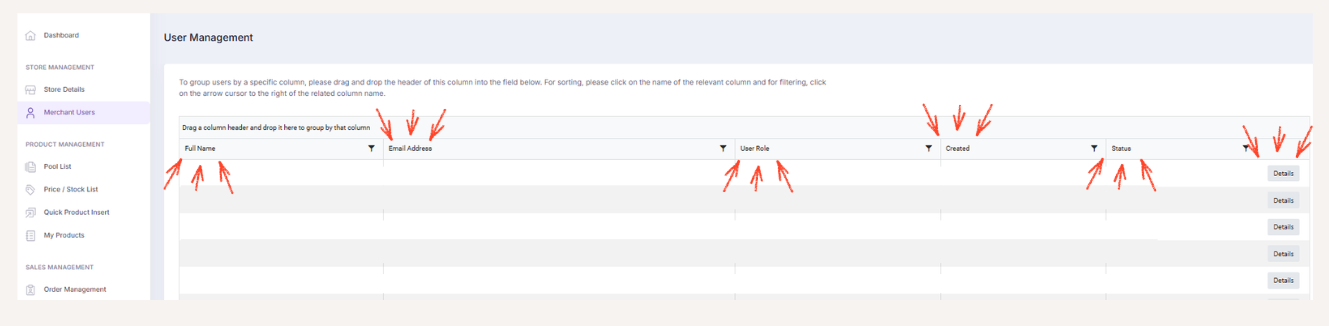
All user definition and configuration processes displayed in this section, including roles and authorizations, are carried out through the Lidia Marketplace Console. The Merchant Console serves as the layer where these definitions are applied and displayed; user creation, role assignment, or role modification actions cannot be performed through this area.
On the user detail screen of any user, the following information can be viewed:
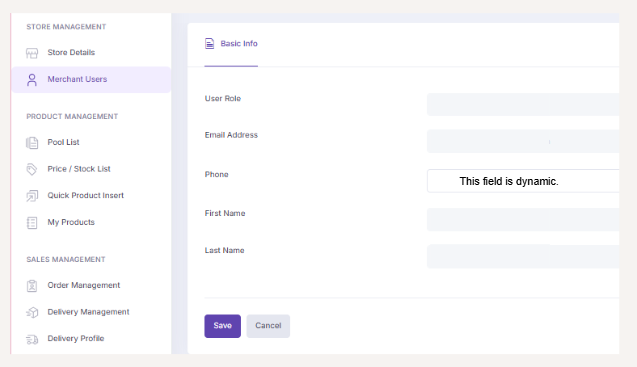
These fields are view-only and cannot be edited.
Only the phone number field is editable.