Lidia Commerce Documentation

The Notification Center provides a centralized area where users can track important operations and changes within the PIM system. Users can define which types of updates they want to be notified about and review previously generated notifications.

Notifications help users stay informed about product and variant updates, catalog changes, data schemas, properties, options, tags, categories, and other system activities.

The notification structure consists of two main sections:

  • Notifications
  • Notification Settings

Notifications Page

The Notifications page provides a centralized view of notifications generated by system activities. Users can track updates, review previous notifications, and manage unread notifications from this page.

The page includes the following key capabilities:

Search and Filtering

Users can quickly locate notifications by:

  • Searching with keywords
  • Filtering by Notification Type
  • Filtering by Date

Viewing Unread Notifications

The Unread Notifications option allows users to display only notifications that have not yet been viewed.

This helps users who receive a large number of notifications focus specifically on new updates.

Notification Details

Each notification entry includes key information about the related operation, such as:

  • Event or action type
  • The user or system that performed the action
  • A description of the performed action or update
  • Notification date

For example, when a custom list or data schema is updated, users can see who performed the update and when it occurred.

Mark All as Read

The Mark All as Read action allows users to mark all currently unread notifications as read in a single operation.

This makes it easier to manage the notification list and focus only on newly generated notifications.
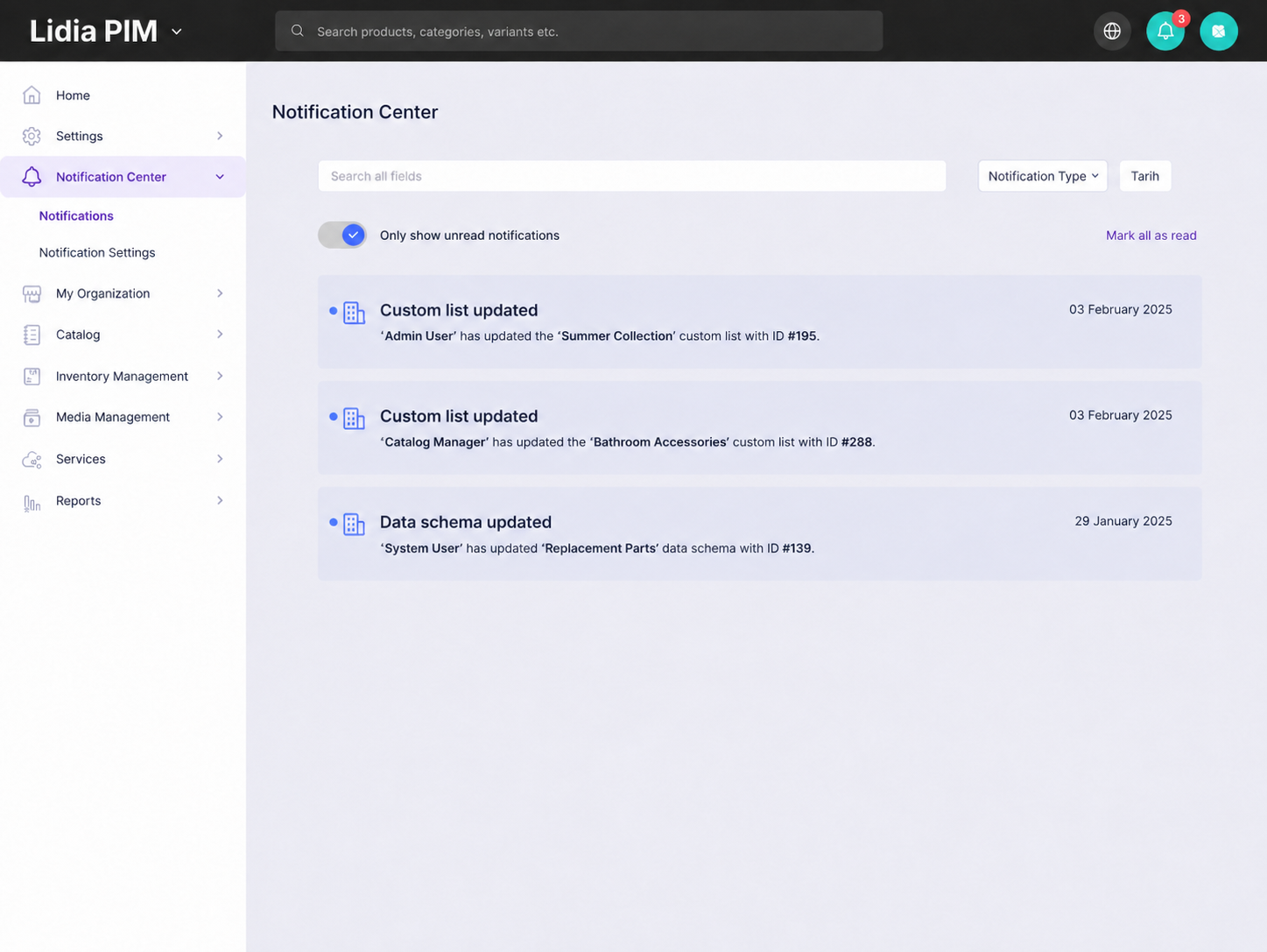
Lidia PIM Notification Center screen

Notification Settings Page

The Notification Settings page allows users to define which operations and changes they want to receive notifications for.

Notification preferences can be managed separately for different PIM components.

Catalog Notifications

Catalog notifications allow users to receive updates related to products and variants.

  • Product updates
  • Variant updates
  • Changes related to products or variants

Data Schema Notifications

Users can receive notifications for operations performed on data schemas.

  • Creating a new data schema
  • Updating an existing data schema
  • Removing a data schema

Property Notifications

Property notifications allow users to track changes made to properties.

  • Adding a property
  • Updating a property
  • Removing a property

Option Notifications

Users can receive notifications for changes made to options and option values.

  • Adding a new option
  • Updating an option
  • Removing an option
  • Modifying option values

Tag Notifications

Notification preferences can be configured for operations performed on tags.

  • Adding tags
  • Updating tags
  • Removing tags

Category Notifications

Category notifications allow users to track changes made to the category structure.

  • A new category is added
  • A category is updated
  • A category is removed

Trademark Notifications

Users can receive notifications for changes made to trademark records.

  • Adding a trademark
  • Updating a trademark
  • Removing a trademark

Custom List Notifications

Custom List notifications allow users to track operations performed on custom lists.

  • A new custom list is created
  • An existing list is updated
  • A list is removed

Saving Notification Preferences

Notification preferences selected by the user are saved using the Save Changes button.

This allows each user to customize the Notification Center by enabling only the notification types that are relevant to them.

Benefits of the Notification Structure

The notification system helps users stay informed about critical changes within the PIM system.

It enables users to:

  • Track product and catalog changes more easily,
  • Choose which notification types are relevant to them,
  • Quickly access unread notifications,
  • Monitor important system updates from a centralized location.

As a result, the Notification Center provides a more visible and manageable way to follow changes across the PIM system.

<FOOTER>