Lidia Commerce Documentation

The Settings section contains the configurations used to manage system-wide structures and administrative settings within the Lidia B2C Console. Configurations defined in this section can be referenced by other areas of the Console and help ensure that users, permissions, and system behavior are managed consistently.

Authorization

The Authorization section is used to manage users, roles, and permissions. It consists of two main areas: Roles and Users.

  • Roles: The Roles page displays the roles defined in the system. Authorized users can create new roles and export the existing role list. On the Role Detail page, users assigned to the selected role are displayed, while permissions can be configured as View or Edit.
  • Users: The Users page displays users who are authorized to access the Lidia B2C Console. Authorized users can create new users and export the existing user list. On the User Detail page, basic user information, assigned roles, permissions, and user-related notes can be viewed and managed depending on the active user's permissions.
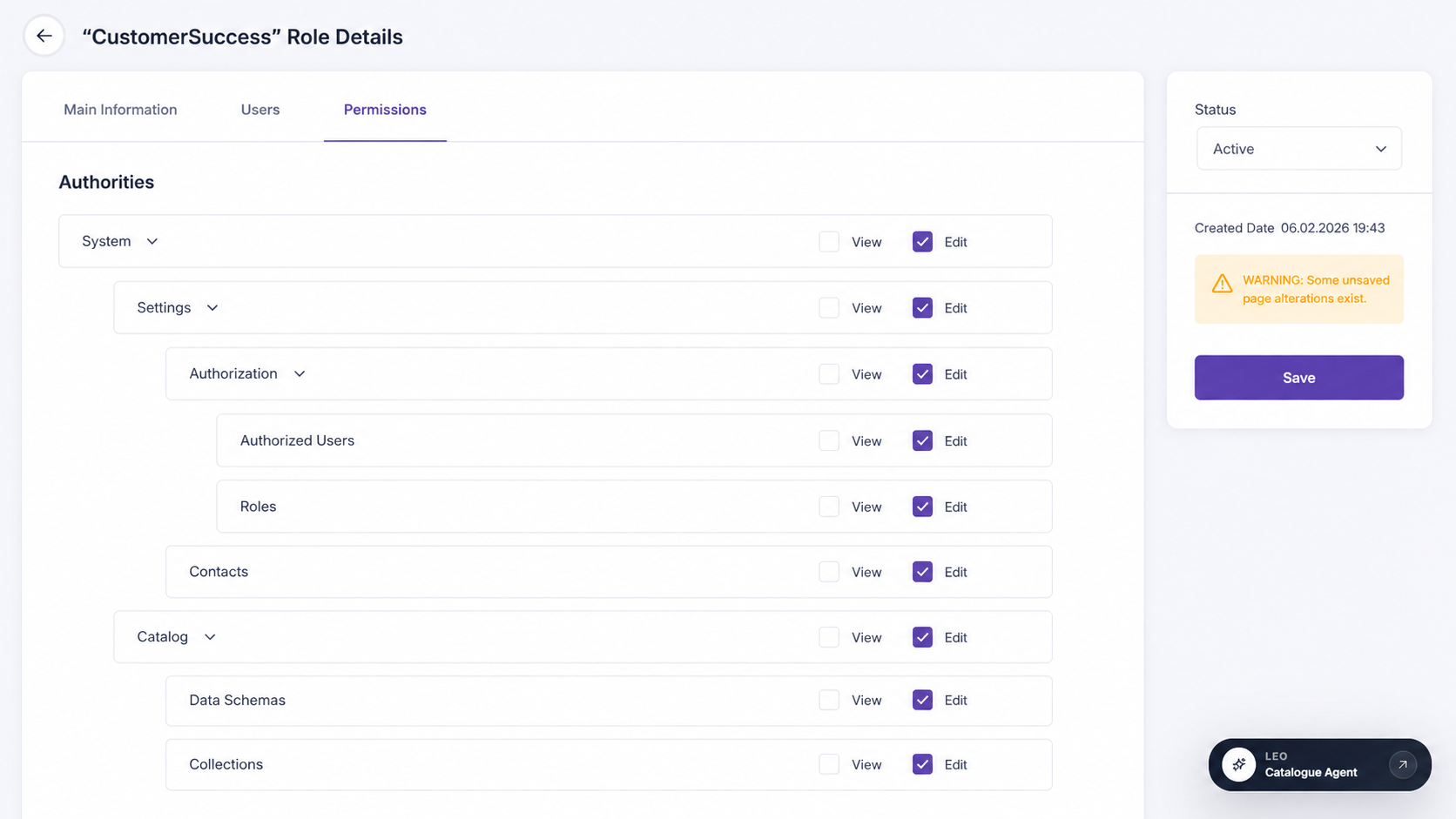
Lidia B2C Console authorization and role permissions

Legal

The Legal section is used to centrally manage legal documents and the organizations responsible for those documents within the Lidia B2C Console. This structure helps ensure that legal content is maintained in an up-to-date, traceable, and versioned manner.

Legal Documents

The Legal Documents page is used to create, view, and manage legal content used within the system.

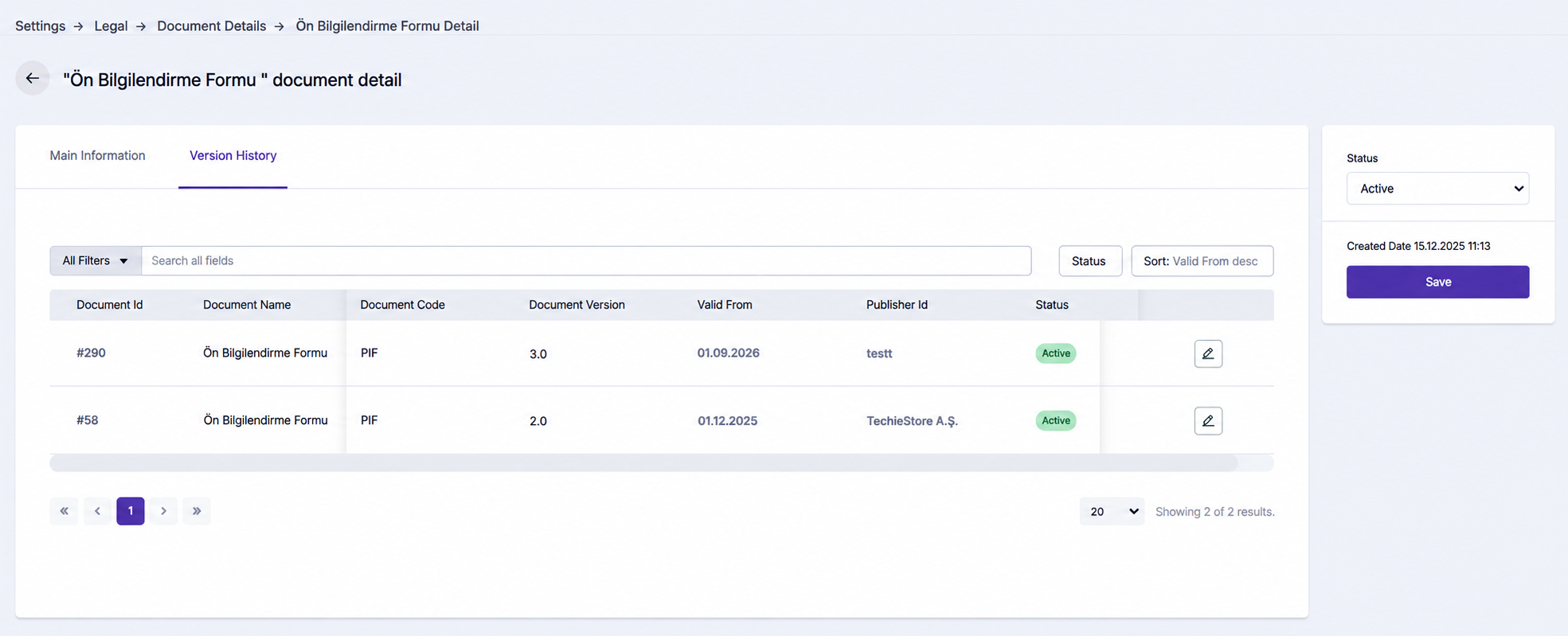
Users can view documents together with information such as document ID, document name, publisher, document code, version information, validity period, and active/inactive status. Legal content such as personal data protection notices, preliminary information forms, and similar legal documents can be managed and versioned over time.

New documents can be created, existing documents can be managed, document validity can be tracked, and basic information can be reviewed on the detail page. The version history makes it possible to follow previous versions and changes over time.

Lidia B2C Console legal documents management

Responsible Parties

The Responsible Parties page is used to define and manage the organizations responsible for legal documents.

The responsible organization may be the B2C business itself or a third-party organization such as a payment provider, service provider, or another external party.

New responsible organizations can be defined, existing parties can be managed, basic organization information can be viewed, and the legal documents associated with each responsible party can be tracked. This helps ensure that legal content owned or managed by different third parties is associated with the correct organization.

Payments

The Payments section is the central area for defining and managing the payment structure offered to customers through the Lidia B2C Console. Payment providers, payment institutions, payment instruments, instrument groups, payment options, and BIN codes are associated with each other to determine how the payment process should operate under different conditions.

Service Providers

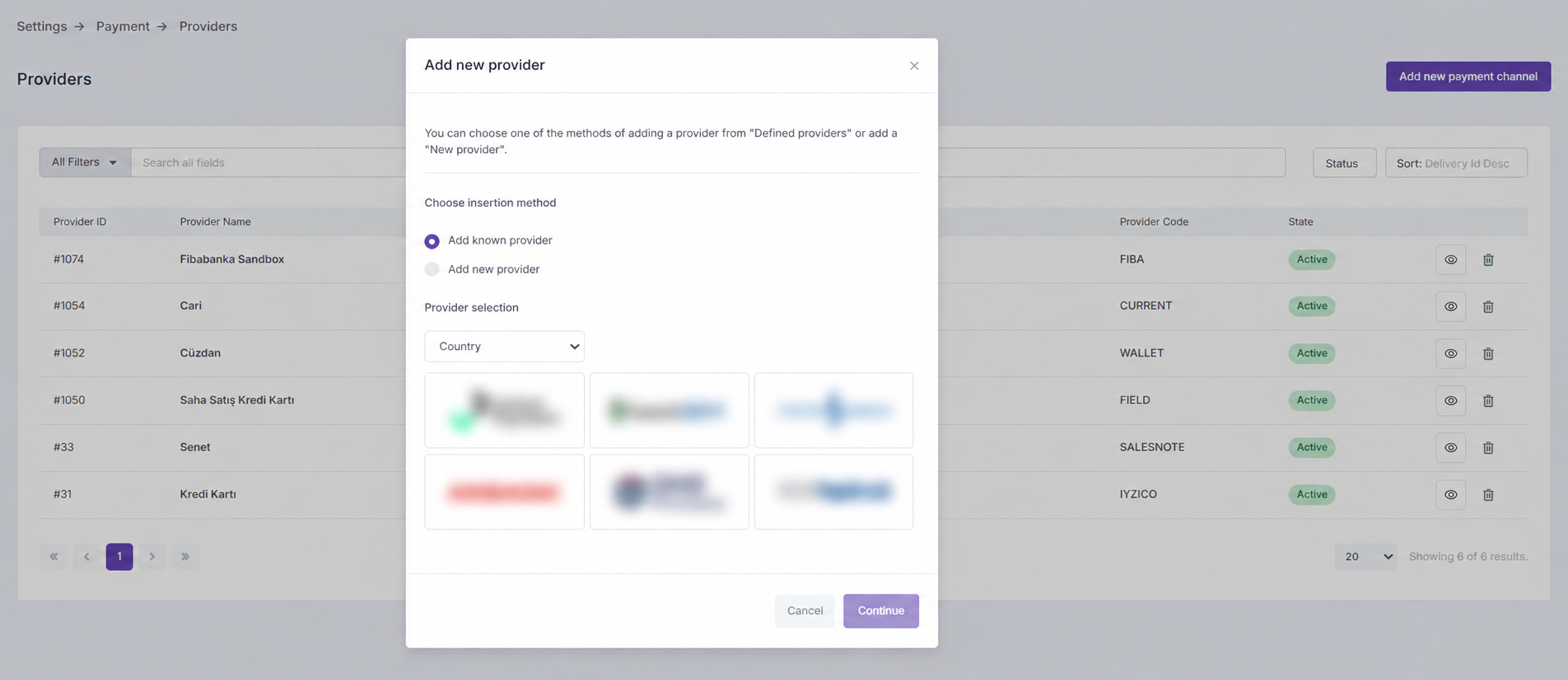
The Service Providers page is used to define the infrastructures or providers through which payment transactions are processed. This structure allows providers for credit card, wallet, promissory note, or similar payment methods to be added to the system and determines which provider should be used under specific payment conditions.

Users can select from providers already defined in the system or create a new provider. Installment options, applicable rates, and active/inactive statuses can be managed for each provider. Integration information can also be viewed, while processed transactions can be tracked with details such as amount, date, and transaction type.

For example, credit card payments may be routed through one payment infrastructure, while digital wallet payments may be processed through another provider.

Lidia B2C Console payment service providers

Payment Institutions

The Payment Institutions page is used to define banks and payment organizations involved in the payment process and associate them with other payment structures.

Payment instruments and BIN codes associated with an institution can be viewed, while new relationships can be created or existing ones updated.

Payment Instruments

The Payment Instruments page is used to define the different payment instruments that customers can use during checkout.

BIN codes and available payment options associated with a payment instrument can also be viewed and updated.

For example, a credit card issued by a specific bank can be defined as one payment instrument, while a debit card issued by the same bank can be defined as a separate payment instrument.

Instrument Groups

Instrument Groups allow similar payment instruments to be grouped under a common structure. This helps organize different instruments that belong to the same payment category or type.

For example, credit cards issued by different banks can be grouped under a common Credit Card instrument group.

Payment Options

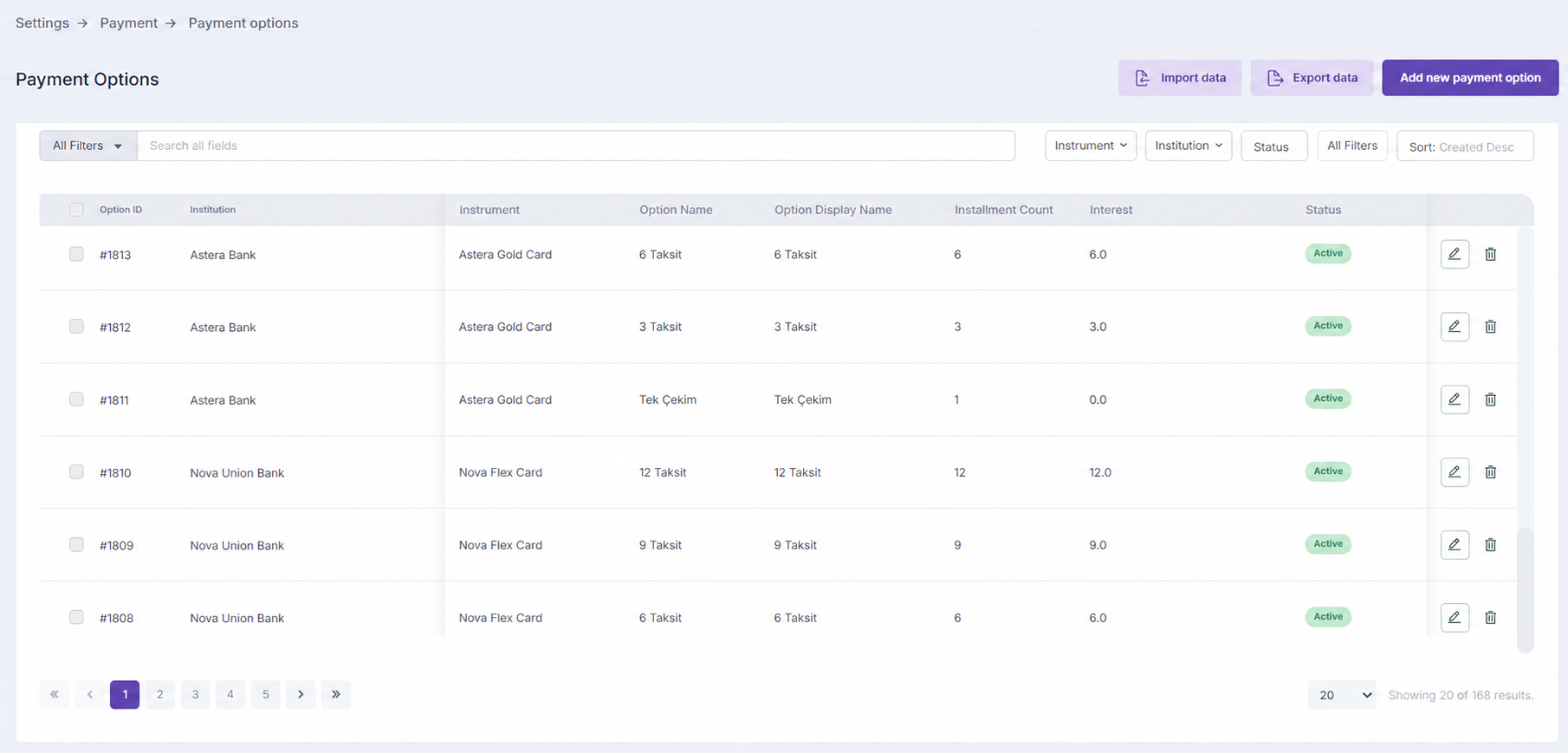
The Payment Options page defines which payment conditions are available for a specific payment institution and payment instrument.

Payment options can be viewed and filtered by payment institution, payment instrument, and installment information. Technical parameters associated with each payment option can also be reviewed. Payment options can also be imported in bulk through Excel or existing data can be exported.

For example, single payment, 3 installments, or 6 installments can be defined as different payment options for a specific credit card.

Lidia B2C Console payment options

BIN Codes

The BIN Codes page is used to manage BIN information that identifies which payment institution or payment instrument a card is associated with.

BIN codes defined in the system can be viewed and their active/inactive statuses can be tracked. BIN codes can also be associated with payment institutions and payment instruments.

For example, the first digits of a customer's card number can be used to identify the relevant bank or card structure and present the appropriate payment options.

Logistics

The Logistics section is the central area for configuring how customer deliveries and return shipments are managed within the Lidia B2C Console. Shipping service providers, delivery profiles, and logistics rules work together to determine which provider and service should be used under specific delivery conditions.

Service Providers

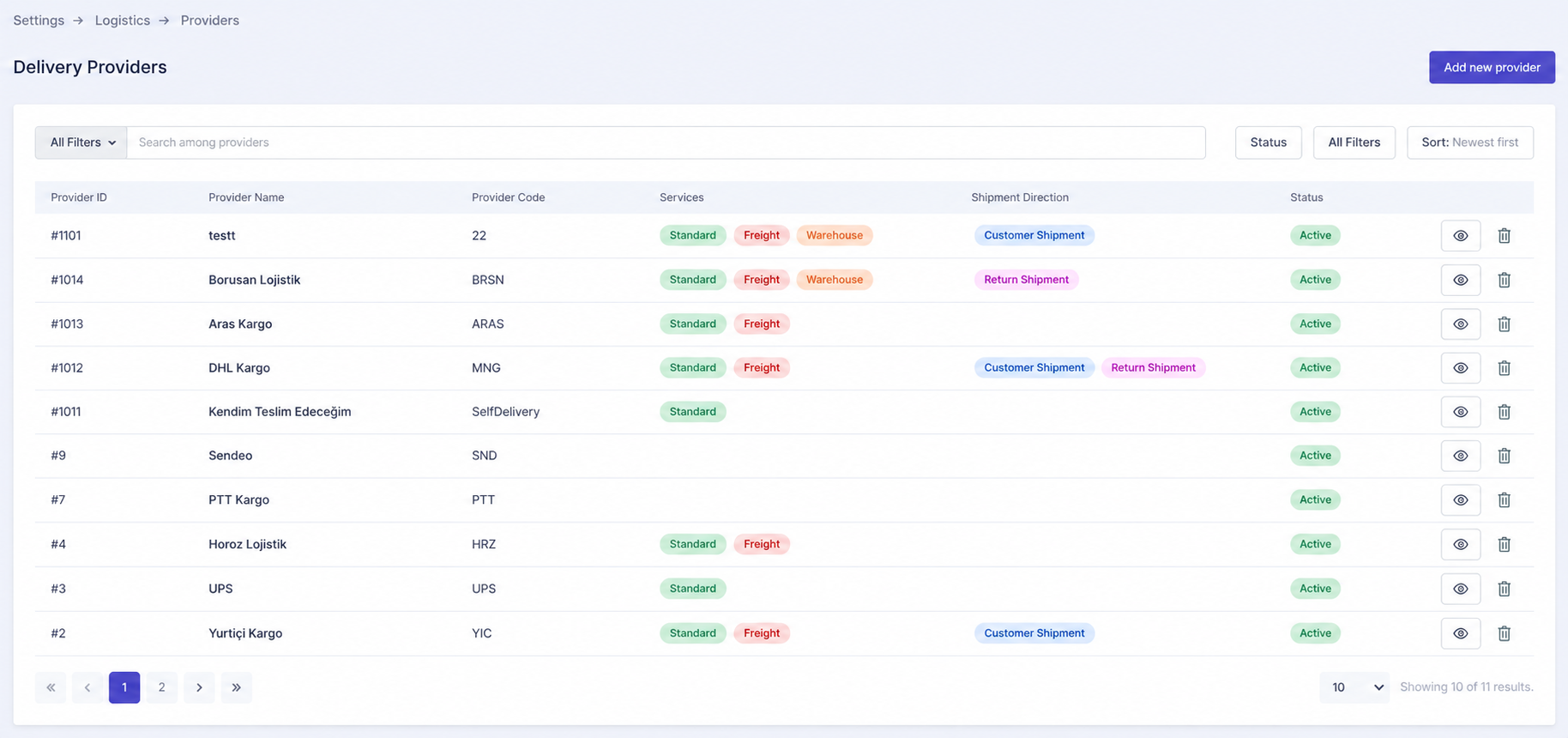
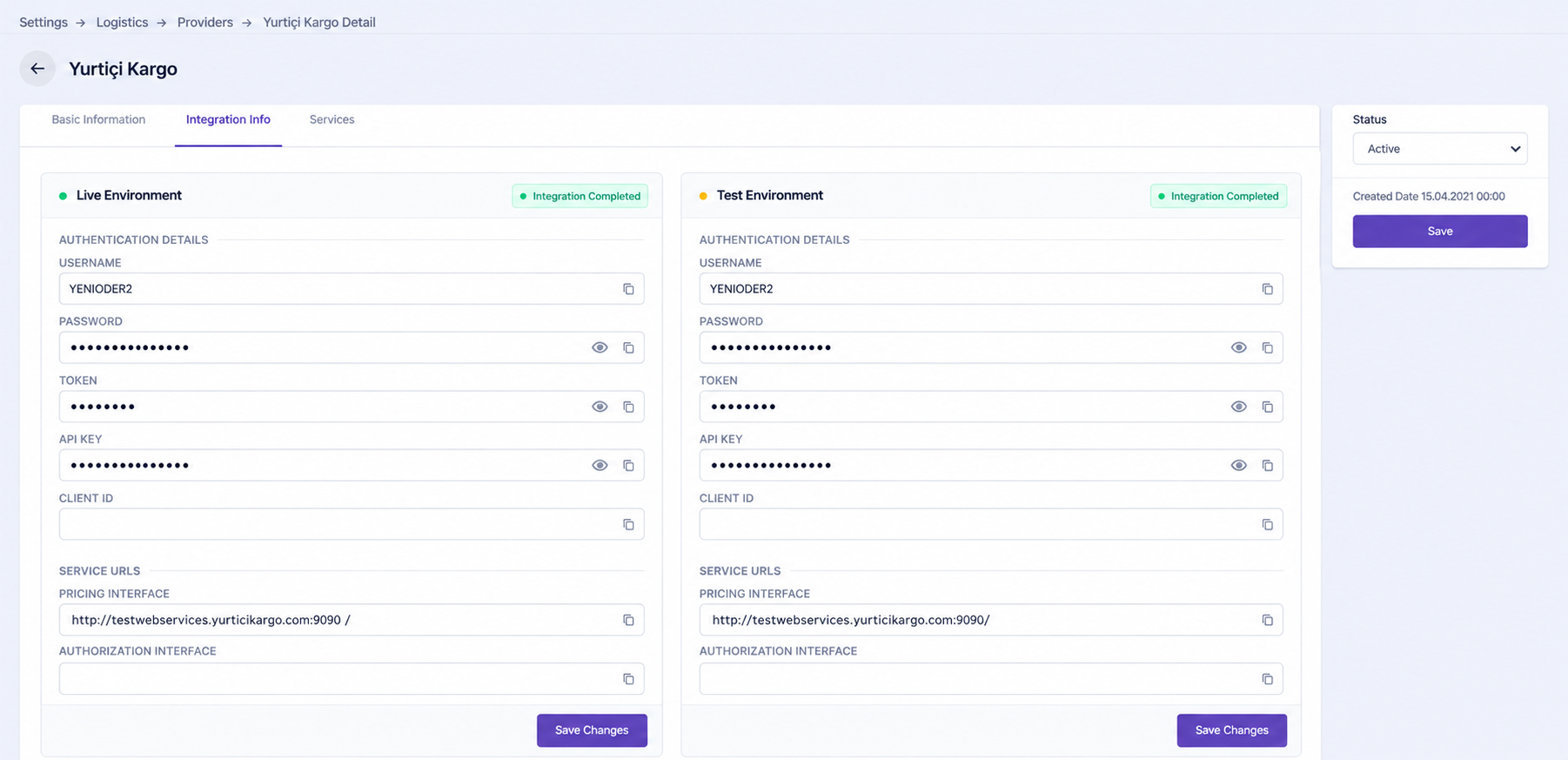
The Service Providers page is used to define the shipping companies and transportation services used in B2C operations.

Multiple services such as small parcel, large parcel, or other delivery services can be added under the same provider. Each service can have its own price list, while the provider's integration information and required connection details can also be managed.

For a service provider to be used in a delivery profile, its required integration information must be completed. If services have been added to the provider, only services with a defined price list can be included in a delivery profile.

A provider's shipment direction is determined by the delivery profiles in which it is used.

Lidia B2C Console delivery providers
Lidia B2C Console delivery provider details

Delivery Profiles

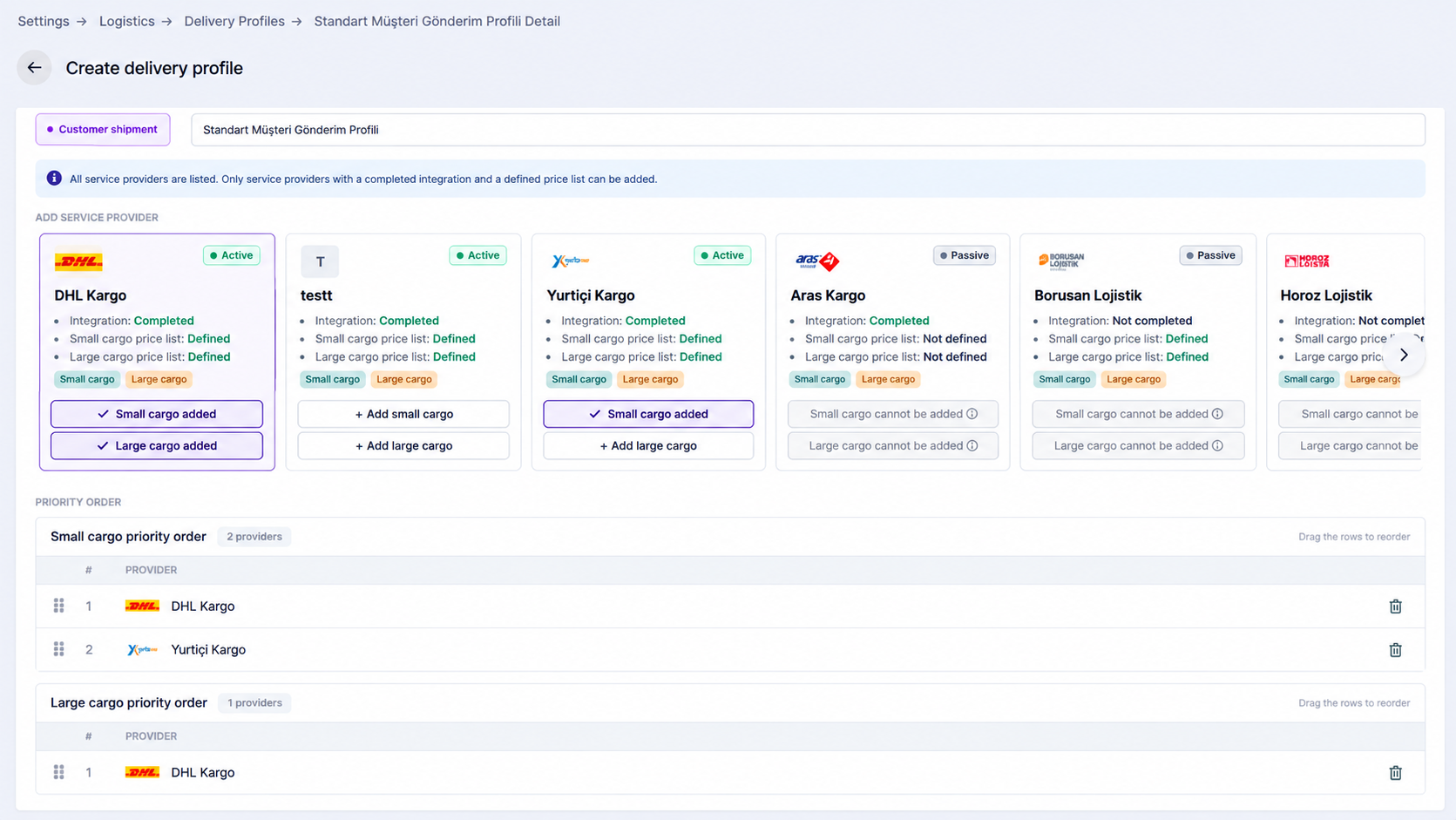
The Delivery Profiles page is used to determine which shipping providers can be used for customer deliveries and returns, as well as the order of priority in which those providers should be considered.

Delivery profiles are managed under two main shipment directions: Customer Delivery and Return Shipment.

Within each profile, separate provider priority lists can be created for small parcel and large parcel shipments. A provider can only be added to a specific list if it offers the corresponding service and a price list has been defined for that service.

For example, if a provider only has an active and properly configured large parcel service, it cannot be added to the small parcel priority list and can only be used in the large parcel flow.

Providers included in a profile can be reordered, new providers can be added, and existing providers can be removed.

Lidia B2C Console delivery profiles

Logistics Rules

The Logistics Rules page is used to define which logistics action should apply when specific shipment or order conditions are met.

Conditions can be based on information such as category, shipment type, delivery type, weight, volume, kilograms, dimensional weight, country, city, district, or distance.

After the conditions are defined, an action is selected to determine which service provider should be used.

For example, if products in a specific category must be shipped as large parcel deliveries and a particular carrier should be used for those shipments, the category and shipment type can be defined as conditions and the corresponding service provider can be selected as the action.

Catalog

The Catalog section includes the configuration areas used to structure, organize, and control product data within the Lidia B2C Console. Data schemas, product relationships, data locks, properties, and options define how product information is modeled and managed across the B2C catalog.

Data Schemas

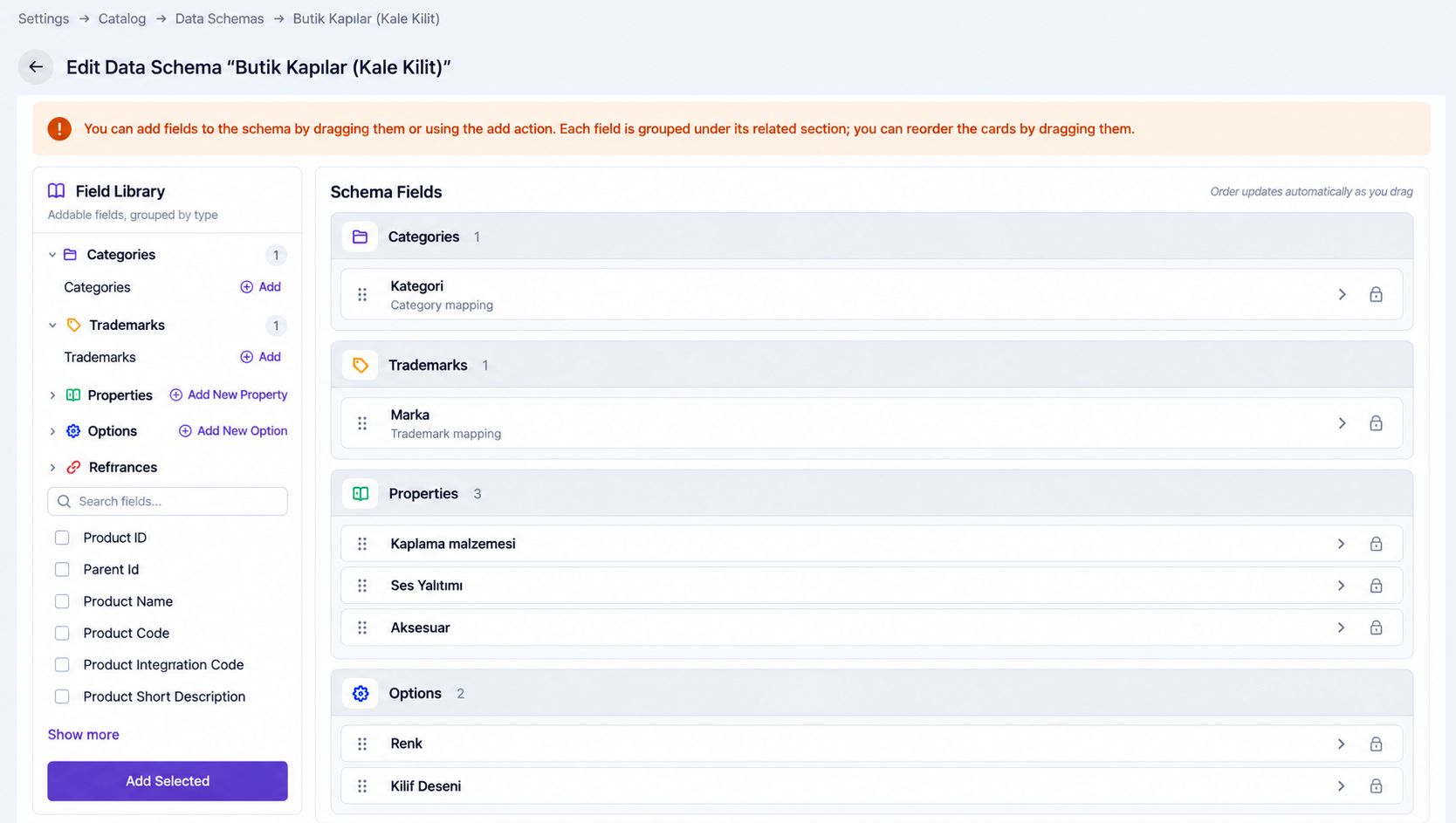
Data Schemas define the structure of product data and determine which fields, properties, options, categories, brands, and references are used for products.

They define which information appears on a product record, which fields are required, and how similar product groups should be managed within a consistent structure.

For example, the same Television data schema can be reused for multiple television product groups when they share the same data structure.

Data schema fields can be defined as:

  • Property: Stores descriptive product characteristics.
  • Option: Stores variant-related information such as size or color.
  • Category: Associates the product with a category.
  • Brand: Associates the product with a brand.
  • References: Associates the product with other records.

This structure helps standardize product data and reduce incomplete or inconsistent data entry.

Lidia B2C Console data schema management

Product Relations

The Product Relations page is used to define reusable relationship types between products, such as related, alternative, accessory, or complementary products.

The relationship type is defined centrally, while the actual product or variant associations are managed from the relevant product records.

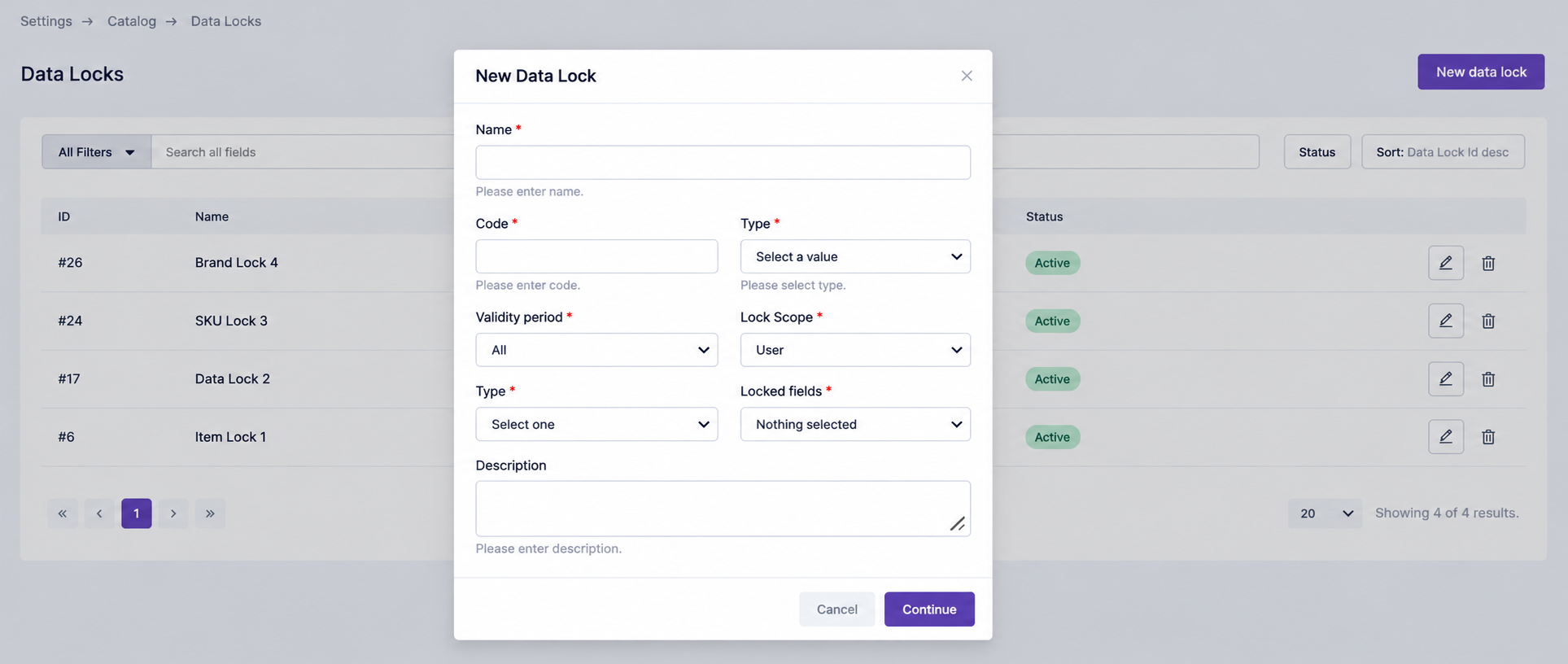
Lidia B2C Console data locks

Data Locks

The Data Locks page is used to protect selected product information from unwanted changes.

Locks can be applied while product data is edited within the system or transferred through external sources, integrations, channels, services, or feeds. This helps prevent critical fields from being overwritten during product data flows.

Properties

The Properties section is used to define descriptive product attributes that provide additional product information without creating a product variation.

It consists of two main areas:

Properties

The Properties page is used to create and manage individual product attributes. For example, Disk Capacity can be defined as a property and contain a value such as 128 GB.

Property Groups

Property Groups organize related properties under common headings. For example, processor, memory, and storage properties can be grouped under Technical Specifications.

Options

The Options section is used to define characteristics that create different product variations, such as color or size.

It consists of four main areas:

Options

The Options page defines the variation dimensions used for products. For example, a T-shirt can use Color and Size as options.

Option Groups

Option Groups organize related options under a common structure. For example, color-related options can be grouped under Colors.

Option Values

Option Values represent the individual values available for an option. For example, Color can contain values such as Red, Blue, and Green.

Option Value Groups

Option Value Groups organize option values into reusable groups. For example, a Colors value group can contain Red, Blue, and Green for reuse across relevant product structures.

Tags

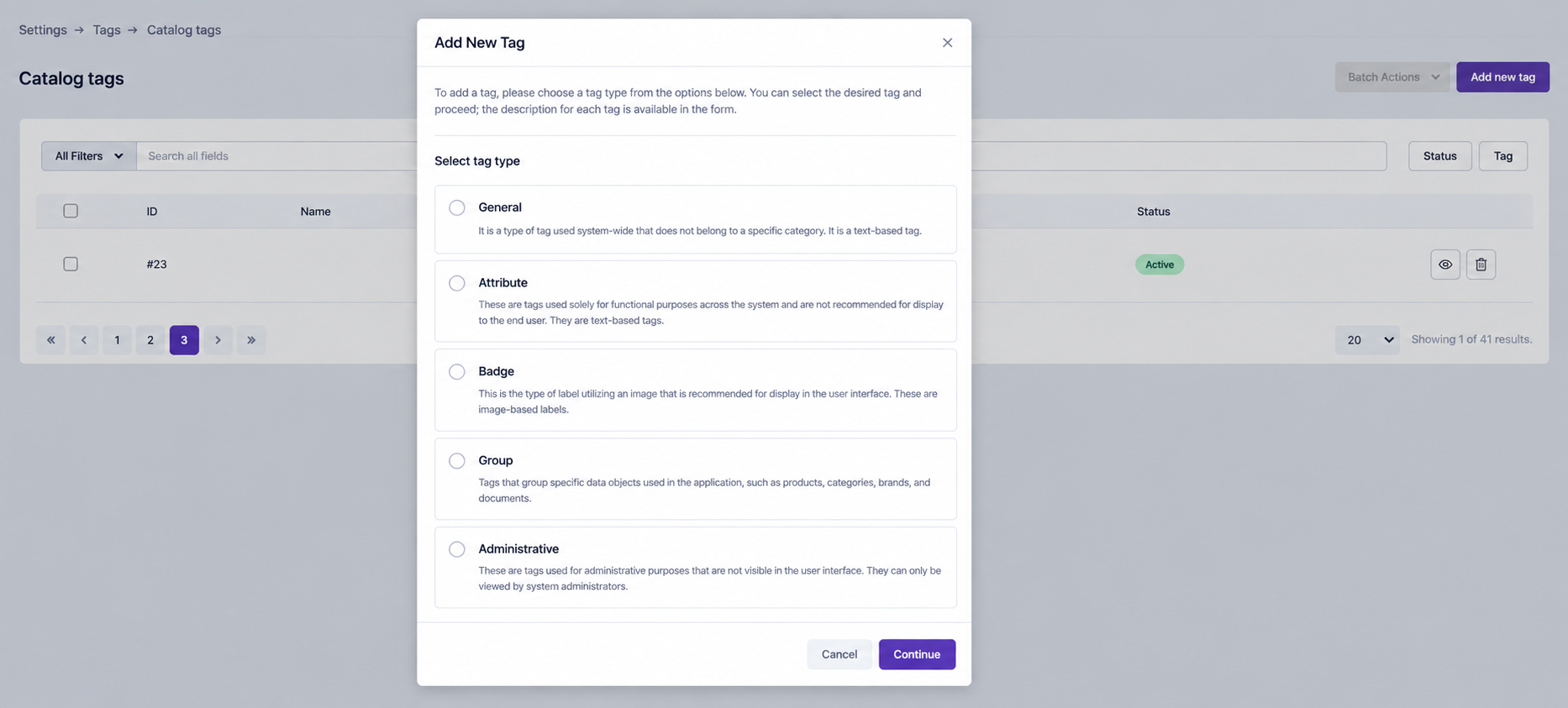
The Tags section is used to define and manage labels that can be used across the Lidia B2C Console. Tags help classify, differentiate, filter, and manage different types of records such as products, content, and customers.

When creating a new tag, the first step is to select the tag type. The selected tag type determines where the tag can be used and how it behaves within the system.

Lidia B2C Console tag management

Catalog Tags

Catalog Tags are used to classify and organize catalog records such as products, categories, and brands. They provide an additional layer of grouping beyond the standard catalog structure and make specific product groups easier to identify and manage.

For example, products can be tagged as New Arrival, Seasonal, or Premium.

Content Tags

Content Tags are used to classify and organize content records within the system. They help group similar content under common labels so that content can be filtered and managed more easily according to purpose, topic, campaign, or other business needs.

For example, content can be tagged based on campaign type, topic, or intended use.

Customer Tags

Customer Tags are used to add operational or business-specific labels to customer records. Unlike customer segments, which dynamically group customers based on defined rules and criteria, customer tags are used to mark individual customer records manually or through specific business processes.

For example, customers can be tagged as VIP, Special Follow-up, or Campaign Participant.

<FOOTER>